iOS 응용 (swift)
[iOS - swift] 버튼에 loading 넣기 (loader), MaterialComponents
jake-kim
2020. 11. 26. 22:17

의존성
pod 'MaterialComponents/ActivityIndicator'버튼 커스텀
- 위 loading기능을 쓰려는 버튼들은 아래의 BaseButton을 상속받아서 사용
//
//  BaseButton.swift
//  Test
//
//  Created by 김종권 on 2020/11/26.
//

import Foundation
import MaterialComponents.MaterialActivityIndicator

class BaseButton: UIButton {
    var activityIndicator: MDCActivityIndicator?
    var originalText: String?

    override init(frame: CGRect) {
        super.init(frame: frame)
        setupView()
    }

    required init?(coder aDecoder: NSCoder) {
        super.init(coder: aDecoder)
        setupView()
    }

    func setupView() {
        layer.cornerRadius = 4
        createActivityIndicator()
    }

    override var intrinsicContentSize: CGSize {
        var size = super.intrinsicContentSize
        size.height = 56
        return size
    }

    private func createActivityIndicator() {
        activityIndicator = MDCActivityIndicator()
        activityIndicator?.sizeToFit()
        activityIndicator?.strokeWidth = 4
        activityIndicator?.cycleColors = [.lightGray]

        activityIndicator?.translatesAutoresizingMaskIntoConstraints = false
        guard let activityIndicator = activityIndicator else {
            return
        }
        addSubview(activityIndicator)

        let xCenterConstraint = NSLayoutConstraint(item: self, attribute: .centerX, relatedBy: .equal, toItem: activityIndicator, attribute: .centerX, multiplier: 1, constant: 0)
        addConstraint(xCenterConstraint)

        let yCenterConstraint = NSLayoutConstraint(item: self, attribute: .centerY, relatedBy: .equal, toItem: activityIndicator, attribute: .centerY, multiplier: 1, constant: 0)
        addConstraint(yCenterConstraint)
    }

    func showLoading() {
        if activityIndicator == nil {
            createActivityIndicator()
        }

        originalText = titleLabel?.text
        setTitle("", for: .normal)
        activityIndicator?.startAnimating()
    }

    func hideLoading() {
        if activityIndicator == nil {
            createActivityIndicator()
        }
        setTitle(originalText, for: .normal)
        activityIndicator?.stopAnimating()
    }
}
사용하려는 커스텀 버튼
//
//  PrimaryButton.swift
//  Test
//
//  Created by 김종권 on 2020/11/26.
//

import Foundation
import UIKit

class PrimaryButton: BaseButton {
    override var isHighlighted: Bool {
        didSet {
            backgroundColor = isHighlighted ? .blue : .systemBlue
        }
    }

    override func setupView() {
        super.setupView()

        // enabled
        setBackgroundColor(.systemBlue, for: .normal)
        setTitleColor(.white, for: .normal)

        // disabled
        setBackgroundColor(.gray, for: .disabled)
        setTitleColor(.white, for: .disabled)
    }
}

public extension UIButton {
    func setBackgroundColor(_ color: UIColor, for state: UIControl.State) {
        UIGraphicsBeginImageContext(CGSize(width: 1.0, height: 1.0))
        guard let context = UIGraphicsGetCurrentContext() else {
            return
        }
        context.setFillColor(color.cgColor)
        context.fill(CGRect(x: 0.0, y: 0.0, width: 1.0, height: 1.0))

        let backgroundImage = UIGraphicsGetImageFromCurrentImageContext()
        UIGraphicsEndImageContext()

        self.setBackgroundImage(backgroundImage, for: state)
    }
}
사용 샘플 - storyboard
- class를 위에서 만든 버튼으로 설정
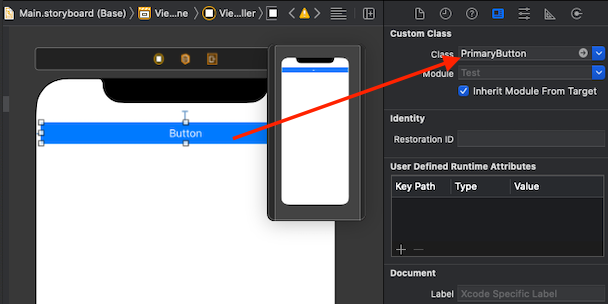
코드 부분 ViewController
//
//  ViewController.swift
//  Test
//
//  Created by 김종권 on 2020/11/26.
//

import UIKit

class ViewController: UIViewController {

    @IBOutlet weak var btn: PrimaryButton!
    override func viewDidLoad() {
        super.viewDidLoad()
        // Do any additional setup after loading the view.
    }

    @IBAction func btnTap(_ sender: Any) {
        btn.showLoading()
    }

}
- 가끔 빌드 시 MaterialComponents관련해서 에러코드가 발생하면서 오류가 나는데, 빌드클린 후 실행하면 해결