iOS 응용 (swift)
[iOS - swift] table view, section으로 cell 그룹화하는 방법, cell 그룹화 (서비스 약관 화면 만들기)
jake-kim
2020. 11. 28. 02:05
구조
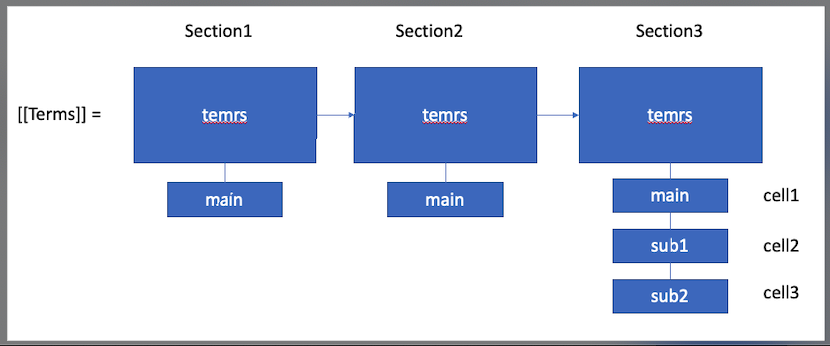
- main과 sub항목으로 나눔
- main항목 하나는 하나의 section으로 구성 (하위들의 데이터: main, sub1, sub2, ...)
- (main1, sub1, sub2) 를 하나의 section으로 두면 인터렉션 관리에 용이하기 때문에 section으로 구성
main선택 -> 하위 sub모두 체크하기 쉬움
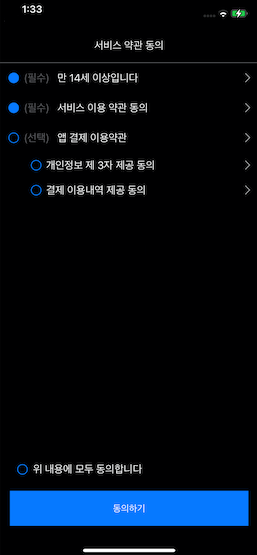
인터렉션
- "위 내용에 모두 동의합니다" 선택: 모든 버튼 체크 / 해제
- "필수"항목 누른 경우, 동의하기 버튼 활성화
- 모든 항목 선택 -> 위 내용에 모두 동의합니다 활성화
- sub항목 존재하는 main항목 선택 -> sub 항목 모두 체크
- sub항목이 존재하는 항목중에 sub항목 모두 체크 -> main항목 체크
Custom cell
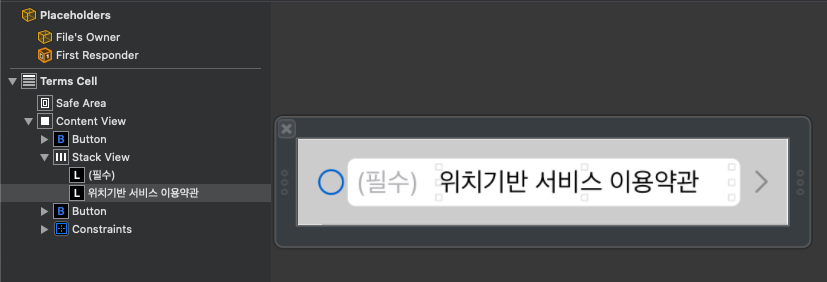
- Hugging, compression값 설정: (필수)의 hugging값은 252, "위치기반 서비스 이요약관"의 compression값은 751
- "(필수)"는 하위 항목들의 메뉴UI를 대비하여 hidden 시킬 수 있기 때문에 stack view로 구성
Terms데이터 모델
struct Terms {
    let termsID: String?
    let title: String
    let contents: String?
    let isMandatory: Bool
    var isAccept: Bool = false
    let type: TermsType
}- Terms데이터가 [[Terms]]로 들어갈 것이고, 데이터는 아래와 같이 작성
static func loadSampleData() -> [[Terms]] {
        let terms1: [Terms] = [
            .init(
                termsID: "1",
                title: "만 14세 이상입니다",
                contents: "blabla",
                isMandatory: true,
                type: .main
            ),
        ]

        let terms2: [Terms] = [
            .init(
                termsID: "2",
                title: "서비스 이용 약관 동의",
                contents: "blabla",
                isMandatory: true,
                type: .main
            ),
        ]

        let terms3: [Terms] = [
            .init(
                termsID: nil,
                title: "앱 결제 이용약관",
                contents: "blabla",
                isMandatory: false,
                type: .main
            ),
            .init(
                termsID: "3",
                title: "개인정보 제 3자 제공 동의",
                contents: "blabla",
                isMandatory: false,
                type: .sub
            ),
            .init(
                termsID: "4",
                title: "결제 이용내역 제공 동의",
                contents: "blabla",
                isMandatory: false,
                type: .sub
            ),
        ]
        return [terms1, terms2, terms3]
    }
Section데이터로 하는 주요 코드
- DataSource
var dataSource = [[Terms]]()- Section, cell count:
1) numberOfSections에서 Section의 갯수 반환
2) 각 section에 해당하는 cell들의 갯수 반환 - 각 section마다(=group) terms정보들 반환
func numberOfSections(in tableView: UITableView) -> Int {
        viewModel.dataSource.count
    }

    func tableView(_ tableView: UITableView, numberOfRowsInSection section: Int) -> Int {
        viewModel.dataSource[section].count
    }
sourceCode: github.com/JK0369/TermsExample