iOS 응용 (swift)
[iOS - swift] computed property와 @IBInspectable 사용 방법
jake-kim
2021. 1. 23. 00:45
* computed property 개념: ios-development.tistory.com/298
computed property, @IBInspectable 기본 개념
- computed property는 이미 메모리에 저장된 공간(변수)에 대한 계산을 통해 값 get/set하는 기능
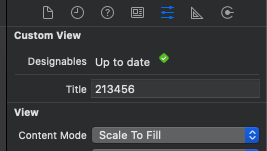
- @IBInspectable은 storyboard파일에서 attribute inspector 탭에서 접근 할 수 있게 속성을 코드로 정의하는 것
custom navigation bar 만들기
- nib파일을 가지고 UIView를 만드는 커스텀 공통 함수 정의 참고: ios-development.tistory.com/311
- nib 초기화 코드 구현
extension UIView {
    func loadViewFromNib(nib: String) -> UIView? {
        let bundle = Bundle(for: type(of: self))
        let nib = UINib(nibName: nib, bundle: bundle)
        return nib.instantiate(withOwner: self, options: nil).first as? UIView
    }

    func xibSetup() {
        guard let view = loadViewFromNib(nib: type(of: self).className) else {
            return
        }
        view.translatesAutoresizingMaskIntoConstraints = false
        view.frame = bounds
        addSubview(view)
    }
}

extension NSObject {
    static var className: String {
        return String(describing: self)
    }
}
- custom view 생성: ios-development.tistory.com/200

- storyboard에서 실시간으로 확인할 수 있는 방법 추가 - 위처럼 prepareForInterfacebuilder 추가
- 아래처럼 입력하면 storyboard에 바로 반영