iOS 응용 (swift)
[iOS - swift] attributedText, NSMutableAttributedString (원하는 문자열 속성 지정, 문자열 attributedText 반환)
jake-kim
2021. 3. 3. 23:16
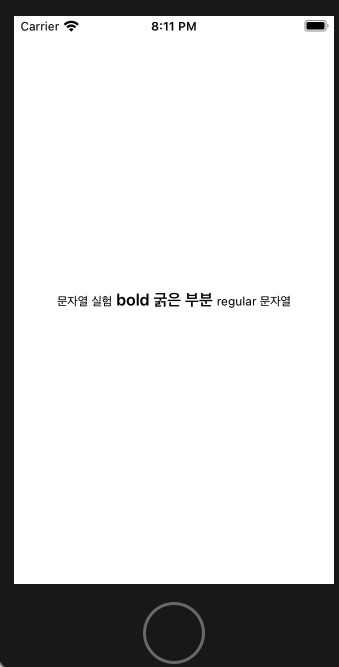
변환형 - 특정 문자열을 입력하면 그 문자열만 bold로 바꾸는 방법
- UILabel extension으로 정의
extension UILabel {
    func bold(targetString: String) {
        let fontSize = self.font.pointSize
        let font = UIFont.boldSystemFont(ofSize: fontSize)
        let fullText = self.text ?? ""
        let range = (fullText as NSString).range(of: targetString)
        let attributedString = NSMutableAttributedString(string: fullText)
        attributedString.addAttribute(.font, value: font, range: range)
        self.attributedText = attributedString
    }
}- 테스트 (text는 이미 가지고 있으며, 특정 부분만 bold시키기)
- 현재 상태: UILabel.text = "문자열 실험 bold 굵은 부분 regular 문자열"
lbl.bold(targetString: "bold 굵은 부분")반환형 - NSMutableAttributedString의 extension으로 정의
- Bold 체
import Foundation
import UIKit

extension NSMutableAttributedString {

    func bold(string: String, fontSize: CGFloat) -> NSMutableAttributedString {
        let font = UIFont.boldSystemFont(ofSize: fontSize)
        let attributes: [NSAttributedString.Key: Any] = [.font: font]
        self.append(NSAttributedString(string: string, attributes: attributes))
        return self
    }
}- regular 체
extension NSMutableAttributedString {

    func bold(string: String, fontSize: CGFloat) -> NSMutableAttributedString {
        let font = UIFont.boldSystemFont(ofSize: fontSize)
        let attributes: [NSAttributedString.Key: Any] = [.font: font]
        self.append(NSAttributedString(string: string, attributes: attributes))
        return self
    }

    func regular(string: String, fontSize: CGFloat) -> NSMutableAttributedString {
        let font = UIFont.systemFont(ofSize: fontSize)
        let attributes: [NSAttributedString.Key: Any] = [.font: font]
        self.append(NSAttributedString(string: string, attributes: attributes))
        return self
    }
}
사용
- UILabel().attributedText 속성에 대입
@IBOutlet weak var lbl: UILabel!
override func viewDidLoad() {
    super.viewDidLoad()
    lbl.attributedText = NSMutableAttributedString()
        .regular(string: "문자열 실험", fontSize: 12)
        .bold(string: " bold 굵은 부분 ", fontSize: 16)
        .regular(string: "regular 문자열", fontSize: 12)
}
활용
- 배경 및 underline
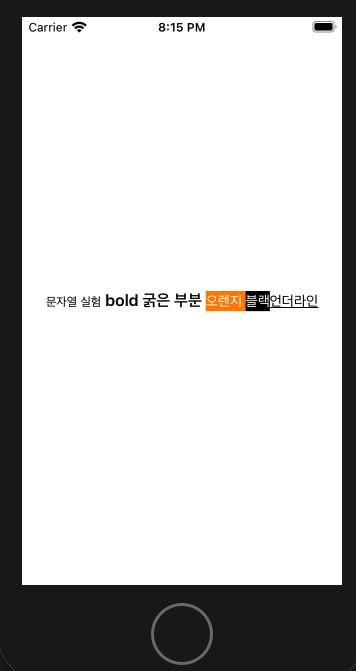
- 정의
extension NSMutableAttributedString {

    var fontSize: CGFloat {
        return 14
    }
    var boldFont: UIFont {
        return UIFont(name: "AvenirNext-Bold", size: fontSize) ?? UIFont.boldSystemFont(ofSize: fontSize)
    }
    var normalFont: UIFont {
        return UIFont(name: "AvenirNext-Regular", size: fontSize) ?? UIFont.systemFont(ofSize: fontSize)
    }

    func bold(string: String, fontSize: CGFloat) -> NSMutableAttributedString {
        let font = UIFont.boldSystemFont(ofSize: fontSize)
        let attributes: [NSAttributedString.Key: Any] = [.font: font]
        self.append(NSAttributedString(string: string, attributes: attributes))
        return self
    }

    func regular(string: String, fontSize: CGFloat) -> NSMutableAttributedString {
        let font = UIFont.systemFont(ofSize: fontSize)
        let attributes: [NSAttributedString.Key: Any] = [.font: font]
        self.append(NSAttributedString(string: string, attributes: attributes))
        return self
    }

    func orangeHighlight(_ value:String) -> NSMutableAttributedString {

        let attributes:[NSAttributedString.Key : Any] = [
            .font: normalFont,
            .foregroundColor: UIColor.white,
            .backgroundColor: UIColor.orange
        ]

        self.append(NSAttributedString(string: value, attributes:attributes))
        return self
    }

    func blackHighlight(_ value:String) -> NSMutableAttributedString {

        let attributes:[NSAttributedString.Key : Any] = [
            .font: normalFont,
            .foregroundColor: UIColor.white,
            .backgroundColor: UIColor.black

        ]

        self.append(NSAttributedString(string: value, attributes:attributes))
        return self
    }

    func underlined(_ value:String) -> NSMutableAttributedString {

        let attributes:[NSAttributedString.Key : Any] = [
            .font: normalFont,
            .underlineStyle : NSUnderlineStyle.single.rawValue

        ]

        self.append(NSAttributedString(string: value, attributes:attributes))
        return self
    }
}
- 사용
@IBOutlet weak var lbl: UILabel!
override func viewDidLoad() {
    super.viewDidLoad()
    lbl.attributedText = NSMutableAttributedString()
        .regular(string: "문자열 실험", fontSize: 12)
        .bold(string: " bold 굵은 부분 ", fontSize: 16)
        .orangeHighlight("오렌지 ")
        .blackHighlight("블랙")
        .underlined("언더라인")
}
* 참고
stackoverflow.com/questions/28496093/making-text-bold-using-attributed-string-in-swift