iOS 응용 (swift)
[iOS - swift] Dynamic Type Sizes (Accessibility Inspector, UIFontTextType)
jake-kim
2021. 5. 27. 01:07
Dynamic Type Sizes
- iOS 7+부터 사용자가 텍스트 크기를 선택할 수 있는 기능 존재
- 아이폰 > 설정 > 손쉬운 사용 > 디스플레이 및 텍스트 크기 > 더 큰 텍스트
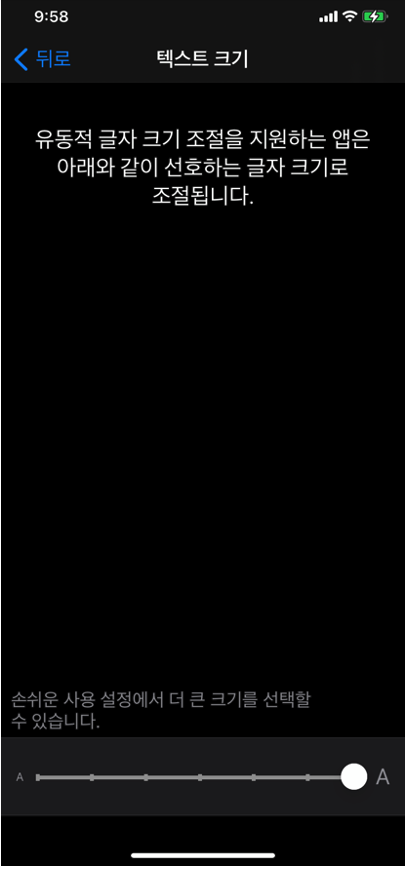
- 사용자가 선호하는 텍스트 크기를 선택할 수 있도록하여 유연성을 제공

- Larger Accessibility Type Sizes: Dynamic Type Sizes보다 더욱 큰 사이즈를 사용

- Dynamic Type Sizes 사용 방법
- 코드에서는 .preferredFont(forTextStyle:)으로 사용
- storyboard에서는 inspector에서 설정

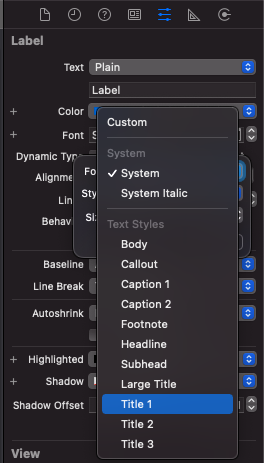


// UIFontTextStyle 사용 방법

        bodyLabel.font = .preferredFont(forTextStyle: .body)
        calloutLabel.font = .preferredFont(forTextStyle: .callout)
        caption1Label.font = .preferredFont(forTextStyle: .caption1)
        headlineLabel.font = .preferredFont(forTextStyle: .headline)
        subheadlineLabel.font = .preferredFont(forTextStyle: .subheadline)
        largeTitleLabel.font = .preferredFont(forTextStyle: .largeTitle)
        title1Label.font = .preferredFont(forTextStyle: .title1)

        bodyLabel.adjustsFontForContentSizeCategory = true // dynamic 타입으로 설정
        calloutLabel.adjustsFontForContentSizeCategory = true
...- 사용하는 서체수를 최소화: 너무 많은 서체를 혼합하면 앱이 조각화되고 엉성해보이는 안좋은 현상 발생
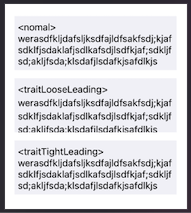
- 시스템에서 라인 사이의 간격을 두 포인트씩 늘리거나 줄일 수 있는 방법을 사용
- UIFontDescriptor의 .withSymbolicTraits()로 설정
    override func viewDidLoad() {
        super.viewDidLoad()

        guard let fontDescriptor = UIFontDescriptor
                .preferredFontDescriptor(withTextStyle: .body)
                .withSymbolicTraits(.traitLooseLeading) else {
            return
        }

        textView.font = .init(descriptor: fontDescriptor, size: 14)

        guard let fontDescriptor2 = UIFontDescriptor
                .preferredFontDescriptor(withTextStyle: .body)
                .withSymbolicTraits(.traitTightLeading) else {
            return
        }

        textView2.font = .init(descriptor: fontDescriptor2, size: 14)
    }
- 가독성과 공간 절약을 위해 글자 사이의 행 간격 주의
- 높이가 제한된 영역에서 2줄 텍스트를 표출해야하는 경우, 줄 사이의 간격을 줄여서 텍스트가 맞도록 설정 가능
- 높이가 제한된 영역에서 3줄 이상의 텍스트를 표출해야하는 경우, 행간을 좁히지 말것
Accessibility Inspector를 사용하여 확인
- 앱의 접근성을 테스트해볼 수 있는 Xcode내장된 기능
- Accessibility Inspector 실행

- 생성된 창 확인
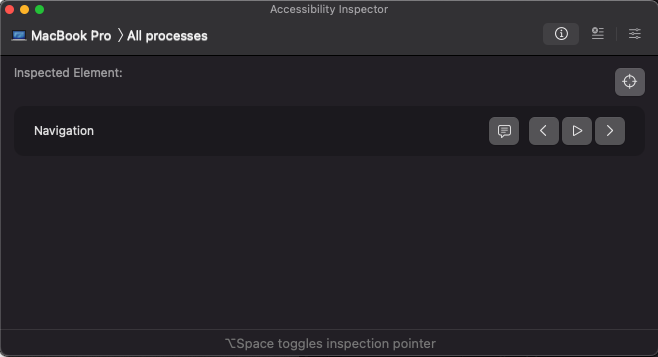
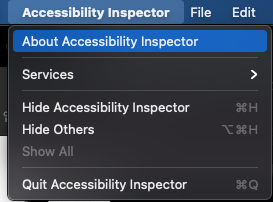
- 창이 나오지 않으면 Accessibility Inspector -> About Accessibility Inspector 선택
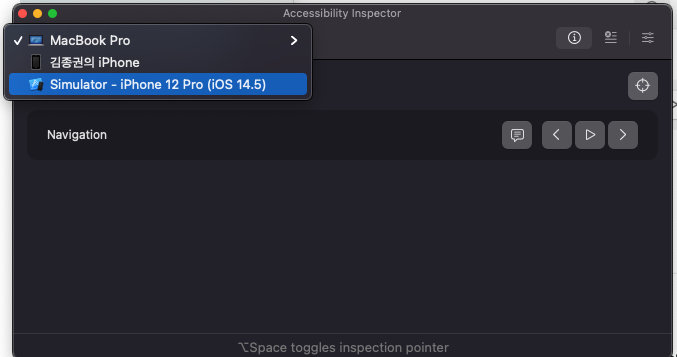
- 테스트할 기기 설정
- Settings 선택

- Font 사이즈 조절하여 테스트

- Dynamic Type Sizes 옵션을 킨 후 테스트
- Font를 디폴트로 선택된 system에서 dynamic type중 하나로 선택
- Automatically Adjusts Font 옵션 체크

- 결과

* 참고
https://www.raywenderlich.com/books/auto-layout-by-tutorials/v1.0/chapters/11-dynamic-type