iOS 기본 (swift)
[iOS - swift] tableView (테이블뷰), section 사용 방법
jake-kim
2021. 6. 13. 14:01
TableView
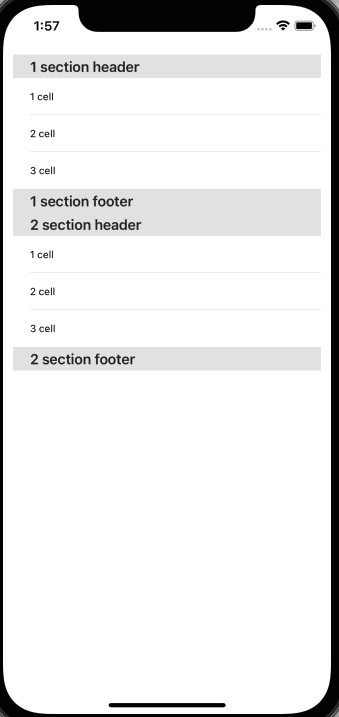
- Section의 구성 = 한개의 Header + 다수의 Cell + 한개의 Footer
- style은 세가지가 존재: https://ios-development.tistory.com/538
* 3가지 스타일 실행화면
| plain | grouped | inset grouped |
 |
 |
 |
Section 사용 방법
- Cell 이용과 동일하게 delegate에서 Section의 개수와 header에 관한 함수, footer에 관한 함수에 각각 데이터 반환하여 사용
extension ViewController: UITableViewDelegate, UITableViewDataSource {

    // MARK: - Section

    func numberOfSections(in tableView: UITableView) -> Int {
        return sectionHeader.count
    }

    func tableView(_ tableView: UITableView, titleForHeaderInSection section: Int) -> String? {
        return sectionHeader[section]
    }

    func tableView(_ tableView: UITableView, titleForFooterInSection section: Int) -> String? {
        return sectionFooter[section]
    }

    // MARK: - Row Cell

    func tableView(_ tableView: UITableView, numberOfRowsInSection section: Int) -> Int {
        return cellDataSource.count
    }

    func tableView(_ tableView: UITableView, cellForRowAt indexPath: IndexPath) -> UITableViewCell {
        let cell = tableView.dequeueReusableCell(withIdentifier: "myCell")!
        cell.textLabel?.text = cellDataSource[indexPath.row]
        return cell
    }
}
* source code: https://github.com/JK0369/TableView_Section_Sample