iOS 응용 (swift)
[iOS - swift] TableView 캐시를 이용한 효율적인 이미지 로딩 방법 (async, cache)
jake-kim
2021. 8. 10. 23:41
* URLSession 개념 참고
* NSCache 개념 참고
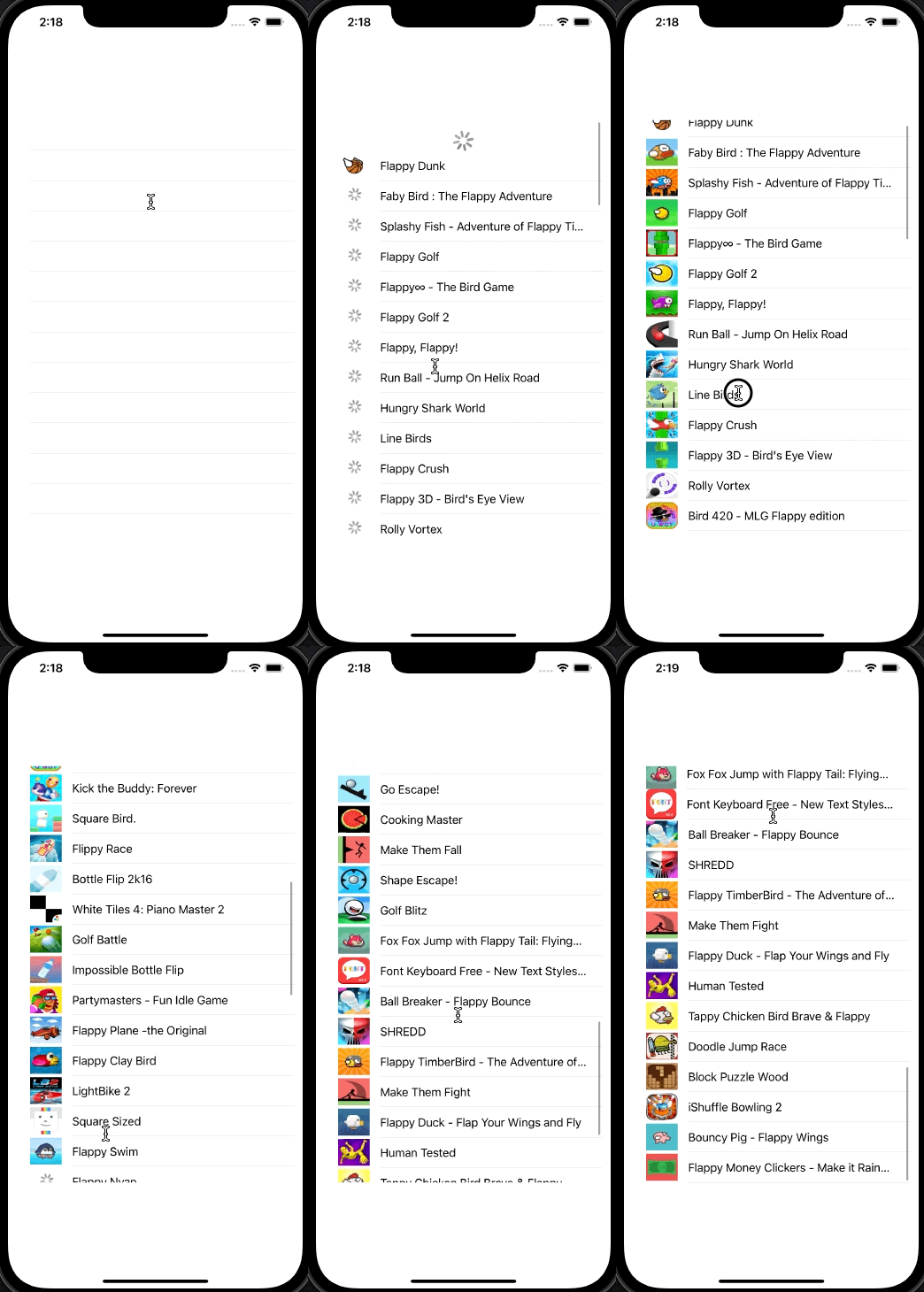
TableView에서 refresh시 데이터 요청
- dataSource는 [AnyObject]형태
- title과 같은 것은 dataSource안에 포함 되어 있지만 이미지같은 경우는 dataSource중 url link를 통해 이미지 획득
- url link를 통해 이미지를 획득할때 시간이 오래걸리므로 cellForRowAt에서 cache와 async방법으로 접근
class ViewController: UIViewController {

    lazy var refreshControl: UIRefreshControl = {
        let control = UIRefreshControl()
        control.addTarget(self, action: #selector(refreshTableView), for: .valueChanged)

        return control
    }()

    var dataSource: [AnyObject] = []
    var session: URLSession = URLSession.shared
    lazy var cache: NSCache<AnyObject, UIImage> = NSCache()

    @IBOutlet weak var tableView: UITableView!

    override func viewDidLoad() {
        super.viewDidLoad()

        tableView.delegate = self
        tableView.dataSource = self
        tableView.refreshControl = refreshControl
        tableView.register(UITableViewCell.self, forCellReuseIdentifier: "GameCell")
    }

    @objc
    func refreshTableView(){

        let url:URL! = URL(string: "https://itunes.apple.com/search?term=flappy&entity=software")
        session.downloadTask(with: url, completionHandler: { (location: URL?, response: URLResponse?, error: Error?) -> Void in

            if location != nil {
                let data:Data! = try? Data(contentsOf: location!)
                do {
                    let dic = try JSONSerialization.jsonObject(with: data, options: .mutableLeaves) as AnyObject
                    self.dataSource = dic.value(forKey : "results") as! [AnyObject]
                    DispatchQueue.main.async {
                        self.tableView.reloadData()
                        self.refreshControl.endRefreshing()
                    }
                } catch {
                    print("something went wrong, try again")
                }
            }
        }).resume()
    }

}

extension ViewController: UITableViewDelegate, UITableViewDataSource {
    func tableView(_ tableView: UITableView, numberOfRowsInSection section: Int) -> Int {
        return self.dataSource.count
    }
}
cellForRowAt에서 async와 cache를 이용하여 이미지 획득
- cell의 text는 바로 표출, image는 placeholder이미지를 삽입
extension ViewController: UITableViewDelegate, UITableViewDataSource {
    func tableView(_ tableView: UITableView, numberOfRowsInSection section: Int) -> Int {
        return self.dataSource.count
    }

    func tableView(_ tableView: UITableView, cellForRowAt indexPath: IndexPath) -> UITableViewCell {

        let cell = tableView.dequeueReusableCell(withIdentifier: "GameCell", for: indexPath)
        let dictionary = self.dataSource[(indexPath as NSIndexPath).row] as! [String:AnyObject]
        cell.textLabel!.text = dictionary["trackName"] as? String
        cell.imageView?.image = #imageLiteral(resourceName: "placeholder")

    }
}- cache에 이미지 데이터가 있으면 해당 데이터 사용
extension ViewController: UITableViewDelegate, UITableViewDataSource {
    func tableView(_ tableView: UITableView, numberOfRowsInSection section: Int) -> Int {
		...
    }

    func tableView(_ tableView: UITableView, cellForRowAt indexPath: IndexPath) -> UITableViewCell {

        ...

        if (cache.object(forKey: (indexPath as NSIndexPath).row as AnyObject) != nil) {
            /// 해당 row에 해당되는 부분이 캐시에 존재하는 경우
            cell.imageView?.image = cache.object(forKey: (indexPath as NSIndexPath).row as AnyObject)
        } else {
            /// 해당 row에 해당되는 부분이 캐시에 존재하지 않는 경우
        }
        return cell
    }
}- cache에 데이터가 없는 경우 서버 통신
    ...

    else {
        /// 해당 row에 해당되는 부분이 캐시에 존재하지 않는 경우
        let artworkUrl = dictionary["artworkUrl100"] as! String
        let url:URL! = URL(string: artworkUrl)
        session.downloadTask(with: url, completionHandler: { (location, response, error) -> Void in
            if let data = try? Data(contentsOf: url){

            /// 이미지가 성공적으로 다운 > imageView에 넣기 위해 main thread로 전환 (주의: background가 아닌 main thread)

            }
        }).resume()
}- 이미지가 다운로드된 경우 UI update를 위해 main thread와 async하게 접근
    /// 이미지가 성공적으로 다운 > imageView에 넣기 위해 main thread로 전환 (주의: background가 아닌 main thread)
    DispatchQueue.main.async {

}- cell을 불러와서 받은 이미지 업데이트
- 핵심: 한번에 모든 cell에 이미지를 표출하지 않고 cellForRow(at:) 메소드를 이용하여 해당 indexPath에 위치하는 cell이 현재 화면에 보이는 경우만 cell획득 (보이지 않으면 nil 반환)
 /// 이미지가 성공적으로 다운 > imageView에 넣기 위해 main thread로 전환 (주의: background가 아닌 main thread)
DispatchQueue.main.async {
    /// 해당 셀이 보여지게 될때 imageView에 할당하고 cache에 저장
    /// 이미지를 업데이트하기전에 화면에 셀이 표시되는지 확인 (확인하지 않을경우, 스크롤하는 동안 이미지가 각 셀에서 불필요하게 재사용)
    if let updateCell = tableView.cellForRow(at: indexPath) {
        let img:UIImage! = UIImage(data: data)
        updateCell.imageView?.image = img
        self.cache.setObject(img, forKey: (indexPath as NSIndexPath).row as AnyObject)
    }
}- cellForRowAt 전체 코드
    func tableView(_ tableView: UITableView, cellForRowAt indexPath: IndexPath) -> UITableViewCell {

        let cell = tableView.dequeueReusableCell(withIdentifier: "GameCell", for: indexPath)
        let dictionary = self.dataSource[(indexPath as NSIndexPath).row] as! [String:AnyObject]
        cell.textLabel!.text = dictionary["trackName"] as? String
        cell.imageView?.image = #imageLiteral(resourceName: "placeholder")

        if (cache.object(forKey: (indexPath as NSIndexPath).row as AnyObject) != nil) {
            /// 해당 row에 해당되는 부분이 캐시에 존재하는 경우
            cell.imageView?.image = cache.object(forKey: (indexPath as NSIndexPath).row as AnyObject)
        } else {
            /// 해당 row에 해당되는 부분이 캐시에 존재하지 않는 경우
            let artworkUrl = dictionary["artworkUrl100"] as! String
            let url:URL! = URL(string: artworkUrl)
            session.downloadTask(with: url, completionHandler: { (location, response, error) -> Void in
                if let data = try? Data(contentsOf: url){

                    /// 이미지가 성공적으로 다운 > imageView에 넣기 위해 main thread로 전환 (주의: background가 아닌 main thread)
                    DispatchQueue.main.async {
                        /// 해당 셀이 보여지게 될때 imageView에 할당하고 cache에 저장
                        /// 이미지를 업데이트하기전에 화면에 셀이 표시되는지 확인 (확인하지 않을경우, 스크롤하는 동안 이미지가 각 셀에서 불필요하게 재사용)
                        if let updateCell = tableView.cellForRow(at: indexPath) {
                            let img:UIImage! = UIImage(data: data)
                            updateCell.imageView?.image = img
                            self.cache.setObject(img, forKey: (indexPath as NSIndexPath).row as AnyObject)
                        }
                    }

                }
            }).resume()
        }
        return cell
    }
* source code: https://github.com/JK0369/cache_tableView
* 참고