iOS 응용 (swift)
[iOS - swift] 전역적으로 TabBar, NavigationBar 색상 변경 방법 (AppAppearance, appearance)
jake-kim
2021. 10. 13. 03:30
apperance() 메소드
- 네비게이션: UINavigationBar.appearance()
- 탭바: UITabBar.appearance()
AppDelegate에서 전역적으로 세팅
- AppAppearance.setupAppearance()으로 접근
final class AppAppearance {
    static func setupAppearance() {
		...
    }
}UINavigationBar.appearance()
- 배경: UINavigationBar.appearance().backgroundColor = UIColor.darkGray
- 타이틀 색상: UINavigationBar.appearance().titleTextAttributes = [NSAttributedString.Key.foregroundColor: UIColor.orange]
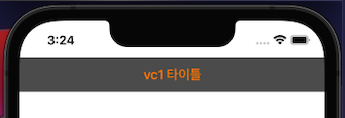
- 아이템 색상: UINavigationBar.appearance().tintColor = .lightGray

TabBar.appearance()
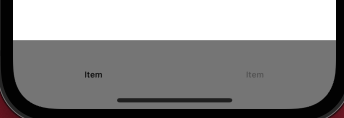
- 배경 색상: UITabBar.appearance().backgroundColor = .gray
- 버튼 색상: UITabBar.appearance().tintColor = .black
- 선택 item과 미선택 item의 색상은 os에서 자동으로 처리
전체 코드
- 정의
final class AppAppearance {
    static func setupAppearance() {

        // MARK: - NavigationBar
        /// navigationBar 배경 색상
        UINavigationBar.appearance().backgroundColor = UIColor.darkGray
        /// navigationBar의 버튼 색상 (ex - back 버튼)
        UINavigationBar.appearance().tintColor = .lightGray
        /// navigationBar 중앙에 존재하는 title 색상
        UINavigationBar.appearance().titleTextAttributes = [NSAttributedString.Key.foregroundColor: UIColor.orange]

        // MARK: - TabBar
        /// TabBar의 버튼 색상 (ex - 탭바 위에 있는 검색 이미지의 색상)
        /// 단, 현재 선택된 ViewController의 tab의 색상과 선택되어 있지 않은 tab의 색상은 자동으로 조정
        UITabBar.appearance().tintColor = .black

        /// TabBar의 background 색상
        UITabBar.appearance().backgroundColor = .gray
    }
}- 호출하는 곳: AppDelegate
func application(_ application: UIApplication, didFinishLaunchingWithOptions launchOptions: [UIApplication.LaunchOptionsKey: Any]?) -> Bool {

    AppAppearance.setupAppearance() // <-

    return true
}