iOS 응용 (swift)
[iOS - swift] cornerCurve 개념 (CornerRadius, round button, iOS 13+)
jake-kim
2022. 2. 27. 19:36
cornerCurve 개념
- CALayer에 프로퍼티로 존재하는 cornerCurve

- 해당 프로피티를 이용하면 조금 더 cornerRadius를 설정했을때 더욱 자연스럽게 표현이 가능
button.layer.cornerRadius = 50
button.layer.cornerCurve = .continuous
ex) 회색 버튼이 .continuous 적용
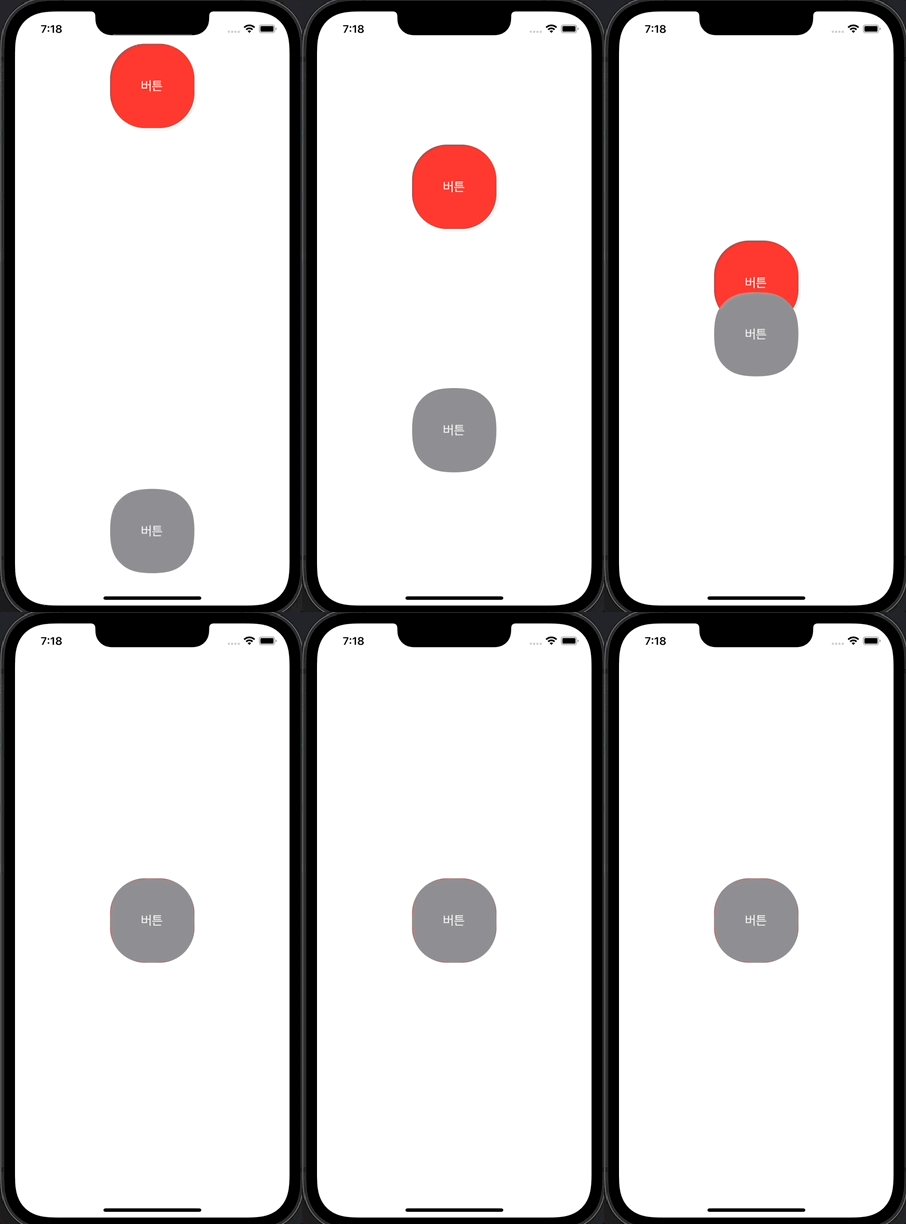

- cornerCurve에는 두 가지 속성이 존재
- .circular: 원에 가까운 radius 처리
- .continuous: 매끄럽고 자연스럽게 처리 (보통 이 속성 사용)

* 전체 코드
(편리한 오토레이아웃 작성을 위해 SnapKit 프레임워크 사용)
import UIKit
import SnapKit

class ViewController: UIViewController {
  private let normalButton: UIButton = {
    let b = UIButton()
    b.setTitle("버튼", for: .normal)
    b.setTitleColor(.white, for: .normal)
    b.setTitleColor(.blue, for: .highlighted)
    b.layer.cornerRadius = 40
    b.backgroundColor = .systemRed
    return b
  }()
  private let featureButton: UIButton = {
    let b = UIButton()
    b.setTitle("버튼", for: .normal)
    b.setTitleColor(.white, for: .normal)
    b.setTitleColor(.red, for: .highlighted)
    b.layer.cornerRadius = 40
    b.layer.cornerCurve = .continuous
    b.backgroundColor = .systemGray
    return b
  }()

  override func viewDidLoad() {
    super.viewDidLoad()
    self.view.addSubview(self.normalButton)
    self.view.addSubview(self.featureButton)

    self.normalButton.snp.makeConstraints {
      $0.top.centerX.equalToSuperview()
      $0.width.height.equalTo(120)
    }
    self.featureButton.snp.makeConstraints {
      $0.bottom.centerX.equalToSuperview()
      $0.width.height.equalTo(120)
    }
  }

  override func viewDidAppear(_ animated: Bool) {
    super.viewDidAppear(animated)
    UIView.animate(withDuration: 2) {
      self.normalButton.snp.remakeConstraints {
        $0.center.equalToSuperview()
        $0.width.height.equalTo(120)
      }
      self.featureButton.snp.remakeConstraints {
        $0.center.equalToSuperview()
        $0.width.height.equalTo(120)
      }
      self.view.layoutIfNeeded()
    }
  }
}
* 참고
https://medium.com/fueled-engineering/continuous-rounded-corners-with-uikit-b575d50ab232