
Notice
Recent Posts
Recent Comments
Link
| 일 | 월 | 화 | 수 | 목 | 금 | 토 |
|---|---|---|---|---|---|---|
| 1 | ||||||
| 2 | 3 | 4 | 5 | 6 | 7 | 8 |
| 9 | 10 | 11 | 12 | 13 | 14 | 15 |
| 16 | 17 | 18 | 19 | 20 | 21 | 22 |
| 23 | 24 | 25 | 26 | 27 | 28 | 29 |
| 30 | 31 |
Tags
- 리펙토링
- HIG
- Refactoring
- RxCocoa
- clean architecture
- 클린 코드
- SWIFT
- Observable
- map
- 클로드코드
- tableView
- uitableview
- UICollectionView
- Protocol
- ios
- uiscrollview
- 애니메이션
- swift documentation
- 스위프트
- UITextView
- swiftUI
- Xcode
- collectionview
- Human interface guide
- rxswift
- MVVM
- claude code
- combine
- Clean Code
- 리팩토링
Archives
- Today
- Total
김종권의 iOS 앱 개발 알아가기
[iOS - SwiftUI] HStack의 alignment 파라미터 잘 활용하기 (VerticalAlignment) 본문
iOS 응용 (SwiftUI)
[iOS - SwiftUI] HStack의 alignment 파라미터 잘 활용하기 (VerticalAlignment)
jake-kim 2025. 6. 11. 11:58Alignment 파라미터 잘 활용하기
- 보통은 HStack, VStack을 사용하면 alignment을 거의 안쓸 수가 있는데 이를 활용하면 여러가지 뷰를 조금 더 쉽게 표현이 가능
HStack(alignment:)
VStack(alignment:)- 먼저 alignment 타입 확인해보면, HStack은 VerticalAlignment 타입이고, VStack은 HorizontalAlignment 타입
- 주의) "HStack은 수평이니 HorizontalAlignment"라고 잘못 생각하는 경우 주의
- alignment는 스택 방향과 반대 방향을 의미함
// VStack 정의 형태
@frozen public struct VStack<Content> : View where Content : View {
   @inlinable public init(alignment: HorizontalAlignment = .center, spacing: CGFloat? = nil, @ViewBuilder content: () -> Content)
}

// HStack 정의 형태
@frozen public struct HStack<Content> : View where Content : View {
   @inlinable public init(alignment: VerticalAlignment = .center, spacing: CGFloat? = nil, @ViewBuilder content: () -> Content)
}
VerticalAlignment 기능
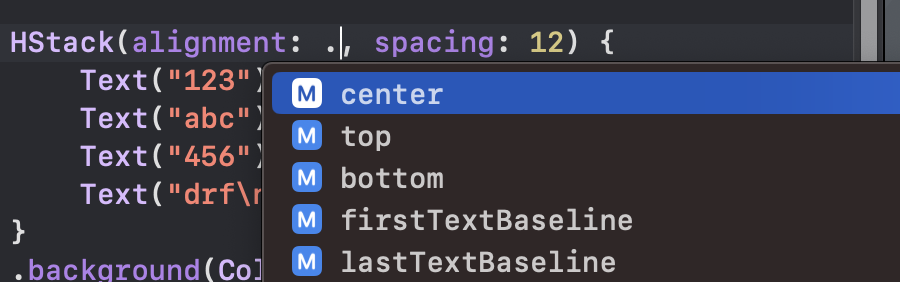
- center (디폴트): 왼쪽에서 오른쪽으로 뷰가 추가되어 있을 때, 세로 부분의 여백이 생길땐 center 정렬
HStack(alignment: .center, spacing: 12) {
    Text("123")
    Text("abc")
    Text("456")
    Text("drf\n\n890")
}
.background(Color.yellow)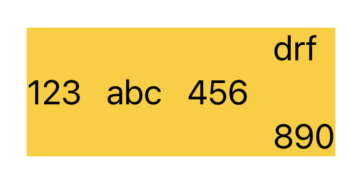
- top: 왼쪽에서 오른쪽으로 뷰가 추가되어 있을 때, 세로 부분의 여백이 생길땐 상단으로 붙이기
HStack(alignment: .top, spacing: 12) {
    Text("123")
    Text("abc")
    Text("456")
    Text("drf\n\n890")
}
.background(Color.yellow)
- firstTextBaseline
- 여러줄로 표현되는 텍스트의 첫 번째 줄 기준으로 정렬하는 것
HStack(alignment: .firstTextBaseline) {
    Text("Short")
        .font(.largeTitle)

    Text("This is a\nmultiline text\n.firstTextBaseline")
        .font(.body)
        .border(.red)
}
.border(.blue)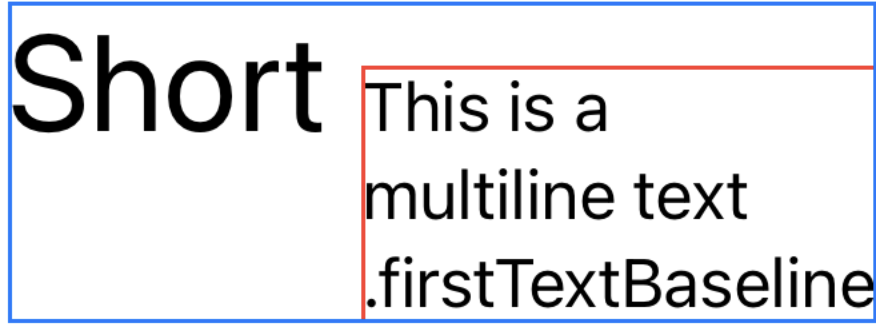
- lastTextBaseline
- 여러줄로 표현되는 텍스트의 마지막 줄 기준으로 정렬하는 것
HStack(alignment: .lastTextBaseline) {
    Text("Short")
        .font(.largeTitle)

    Text("This is a\nmultiline text\n.lastTextBaseline")
        .font(.body)
        .border(.red)
}
.border(.green)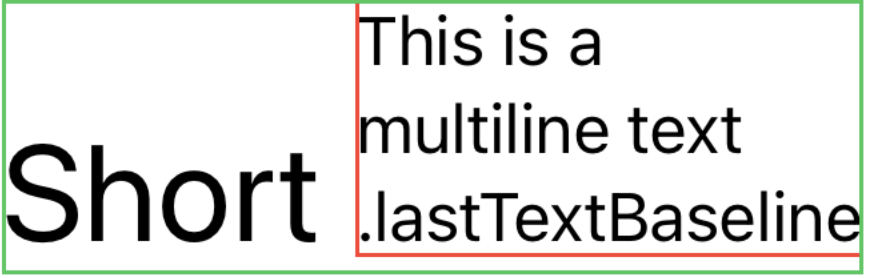
'iOS 응용 (SwiftUI)' 카테고리의 다른 글
'iOS 응용 (SwiftUI)' Related Articles
more


Comments