Notice
Recent Posts
Recent Comments
Link
| 일 | 월 | 화 | 수 | 목 | 금 | 토 |
|---|---|---|---|---|---|---|
| 1 | ||||||
| 2 | 3 | 4 | 5 | 6 | 7 | 8 |
| 9 | 10 | 11 | 12 | 13 | 14 | 15 |
| 16 | 17 | 18 | 19 | 20 | 21 | 22 |
| 23 | 24 | 25 | 26 | 27 | 28 | 29 |
| 30 | 31 |
Tags
- UICollectionView
- uitableview
- UITextView
- swiftUI
- 애니메이션
- clean architecture
- Protocol
- Observable
- HIG
- rxswift
- 리팩토링
- 리펙토링
- ios
- claude code
- 스위프트
- RxCocoa
- Clean Code
- MVVM
- Xcode
- map
- 클로드코드
- uiscrollview
- tableView
- swift documentation
- collectionview
- 클린 코드
- SWIFT
- Refactoring
- combine
- Human interface guide
Archives
- Today
- Total
김종권의 iOS 앱 개발 알아가기
[iOS - Swift] SwiftUI - Environmnet로 인터페이스 제공 방법 (#링크 텍스트) 본문
iOS 응용 (SwiftUI)
[iOS - Swift] SwiftUI - Environmnet로 인터페이스 제공 방법 (#링크 텍스트)
jake-kim 2025. 9. 24. 01:47인터페이스 제공 방법
- 만약 링크 터치 이벤트를 처리하는 LinkDetectionText를 만들고 싶은 경우, LinkDetectionText 내부에서 해당 프로퍼티를 사용
- \.openURL의 정체: SwiftUI가 미리 정의한 EnvironmentKey
@Environment(\.openURL) private var openURL- 아래처럼 openURL 프로퍼티를 선언한 후 이 프로퍼티를 마치 클로저처럼 실행시키면, 외부에서 사용이 가능
struct LinkDetectingText: View {
    @Environment(\.openURL) private var openURL // <-
    let text: String

    var body: some View {
        Text(makeAttributedString(from: text))
            .onOpenURL { url in
                openURL(url) // <-
            }
            .padding()
    }

    private func makeAttributedString(from string: String) -> AttributedString {
        ...
    }
}- 외부에서는 openURL 키를 가지고 envionment 함수의 클로저에서 이벤트 핸들링이 가능
ContentView()
    .environment(\.openURL, OpenURLAction { url in
        print("링크 클릭됨:", url)
        return .handled
    })
.padding()- openURL뿐만이 아닌 EnvironmentKey를 따로 정의하여 외부에 인터페이스 제공이 가능
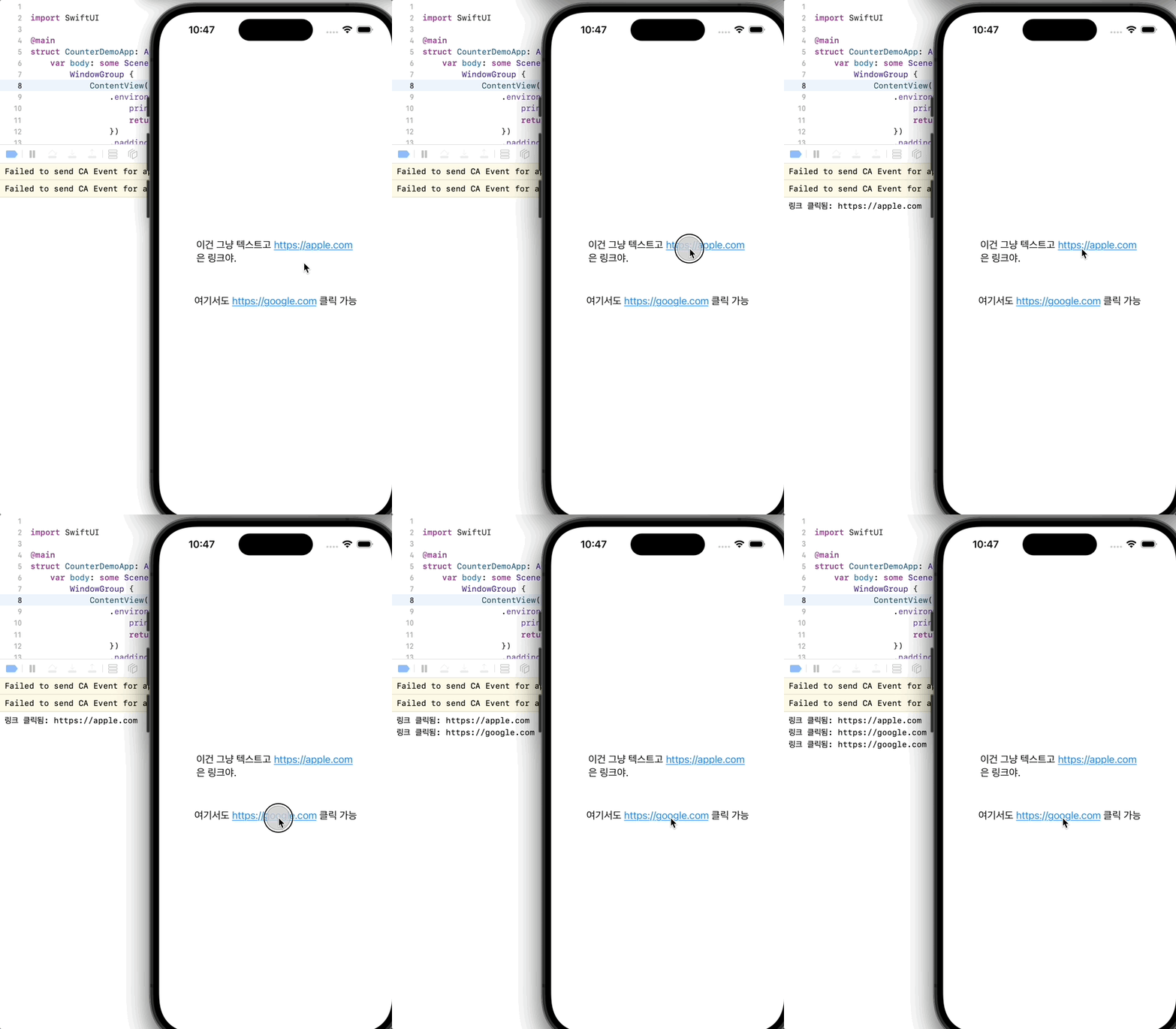
완성)
전체코드)
import SwiftUI

@main
struct CounterDemoApp: App {
    var body: some Scene {
        WindowGroup {
            ContentView()
                .environment(\.openURL, OpenURLAction { url in
                    print("링크 클릭됨:", url)
                    return .handled
                })
                .padding()
        }
    }
}

struct LinkDetectingText: View {
    @Environment(\.openURL) private var openURL
    let text: String

    var body: some View {
        Text(makeAttributedString(from: text))
            .onOpenURL { url in
                openURL(url)
            }
            .padding()
    }

    private func makeAttributedString(from string: String) -> AttributedString {
        var attributed = AttributedString(string)
        if let detector = try? NSDataDetector(types: NSTextCheckingResult.CheckingType.link.rawValue) {
            let matches = detector.matches(in: string, options: [], range: NSRange(location: 0, length: (string as NSString).length))
            for match in matches {
                if let range = Range(match.range, in: string),
                   let url = match.url {
                    let linkRange = attributed.range(of: String(string[range]))!
                    attributed[linkRange].link = url
                    attributed[linkRange].foregroundColor = .blue
                    attributed[linkRange].underlineStyle = .single
                }
            }
        }
        return attributed
    }
}

struct ContentView: View {
    var body: some View {
        VStack(spacing: 20) {
            LinkDetectingText(text: "이건 그냥 텍스트고 https://apple.com 은 링크야.")
            LinkDetectingText(text: "여기서도 https://google.com 클릭 가능")
        }
    }
}'iOS 응용 (SwiftUI)' 카테고리의 다른 글
'iOS 응용 (SwiftUI)' Related Articles
more


Comments